Find matching line items.
Match collection items using identifiers and fallback text. Compare corresponding values even when the order of the lines changes.
Your invoices, PDFs and scans become JSON. Measure what your AI actually extracted. Compare models and prompts against expected answers, field by field.
One prompt. One sample. Verified references.
Conseil technique — septembre
{
  "invoice_number": "LUM-2026-0142",
  "supplier_vat": "FR12345678901",
  "issue_date": "2026-09-18",
  "currency": "EUR",
  "total_amount": 1140,
  "lines": [
    {
      "description": "Conseil technique — septembre",
      "quantity": 12,
      "unit_price": 95,
      "line_total": 1140
    }
  ]
}A correct structure does not prove accurate extraction. A misplaced decimal, a reversed date or a missing line item can make the result unusable.
total_amountFICTIONAL EXAMPLEThe type is correct. The value is not. The benchmark lets you inspect that difference.
Start with one document.
Expand to your difficult cases.
Paste your prompt and a JSON example. JsonEval detects the structure; you adjust types, collections and metrics in the builder.
prompt.txt + example.jsonImport a document sample. Add the correct answers or have a model prefill them, then review this gold.
documents + goldChoose models, confirm the cost estimate and launch the run. Compare fields, cost and latency before changing your prompt.
benchmark + differencesScores between 0 and 1.
The detail behind the average.
| JSON field | Type | What we check | Possible metric |
|---|---|---|---|
invoice_number | string | The right identifier | exact |
supplier_vat | string | The right VAT number | exact |
total_amount | number | The amount and its tolerance | number_tolerance |
issue_date | date | A normalized date | date_match |
lines[].description | string | A comparable description | fuzzy / semantic |
lines[].quantity | number | A quantity on the right line | number_tolerance |
Match collection items using identifiers and fallback text. Compare corresponding values even when the order of the lines changes.
Native PDFs or pages rendered as images: create separate variants to observe their effect on extraction using the same prompt.
Explore errors, cost per document and latency. Stored predictions can be rescored after correcting gold.
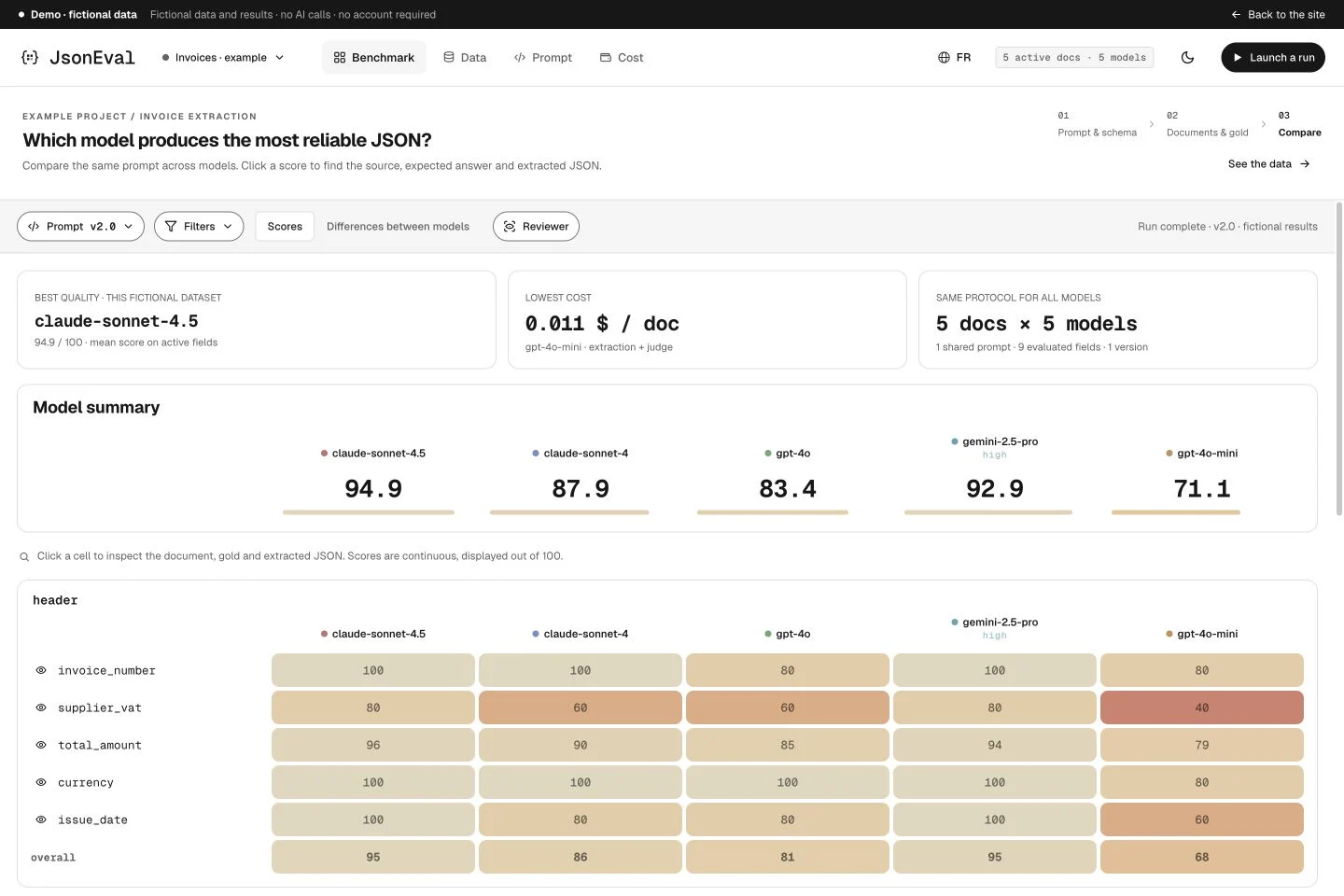
The schema defines what you evaluate. Gold defines the expected answer. The run shows the difference.
OCR Eval is the evaluation workflow for AI document extraction: document → LLM → JSON. You provide PDFs, scans or images, a prompt, a schema and expected answers. JsonEval compares models and prompt versions on this data. This workflow evaluates extracted fields; it is not a standalone OCR service or an import interface for third-party OCR engine results.
Yes. Variants let you compare native PDF input with pages rendered as images using a shared prompt. Each variant appears separately in the benchmark. Support depends on the chosen model and provider.
Gold is the correct JSON expected for each document. Import these values, enter them manually or prefill them with a reference model. Review them alongside the document and correct them before relying on scores: an incorrect reference skews the comparison.
A collection groups the line items to evaluate. Configure matching identifiers and, if needed, a fallback text field to find corresponding items when their order changes. Fields are then scored on matched lines; missing items become visible.
Extracted values are compared with gold using the metric selected for each field: exact match, text similarity, meaning, numeric tolerance or dates. Scores range from 0 to 1, and analytics also show cost per document and latency. An estimate precedes every action that calls an LLM; semantic scoring may use a paid judge.
Explore a fictional project. Then switch to your own documents.
No-account demo · Fictional data · No inference