OUR SPECIALTY
Invoices → JSON
Totals, VAT and every line item. Compare difficult scans, too.
invoice_numbertaxtotalitems[].quantityEvaluate their JSON outputs against the same documents and references.
Find the best model for your extraction.
Prepare without an account. You confirm the cost before any evaluation by a model.
One evaluation workbench.
Test datasets built around your needs.
Totals, VAT and every line item. Compare difficult scans, too.
invoice_numbertaxtotalitems[].quantityThe right intent, order and deadline.
customerorder_idintentdue_dateMerchant, currency, taxes and amount. Small details matter, too.
merchantdatecurrencytotalParties, dates and clauses. Separate what is written from what is invented.
parties[]effective_datejurisdictionrenewal_clauseReferences, quantities and addresses. Find matching lines regardless of their order.
order_iditems[].skuitems[].quantitydelivery_addressPrices, units, features and variants. A catalogue deserves reliable data.
skupricedimensionsvariants[]Import a representative dataset and its expected answers. Evaluate emails and product sheets from text exports, PDFs or images.
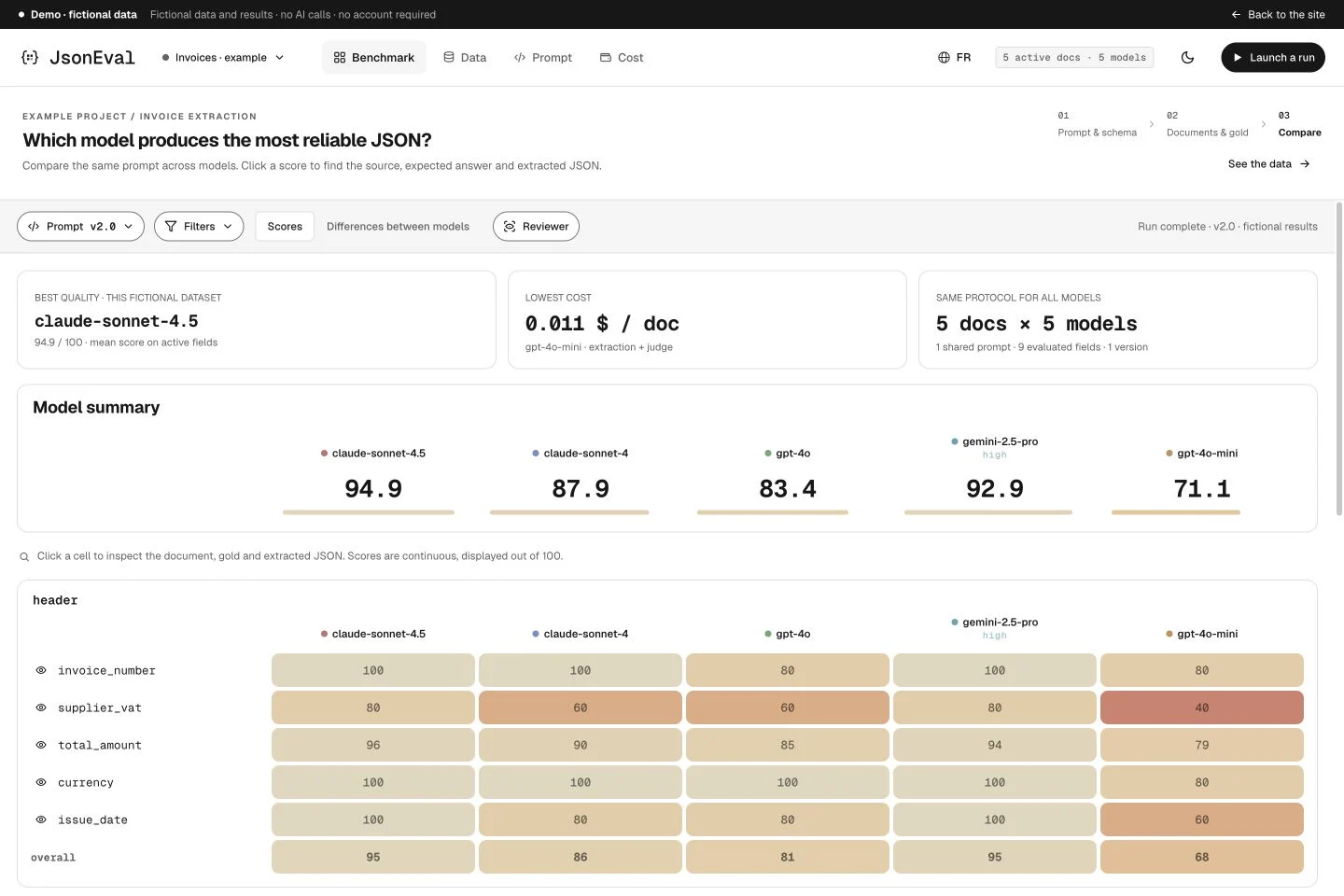
A slightly wrong amount. A poorly normalized date. A missing line item. One overall score is not enough: JsonEval shows where your extraction improves and where it regresses.
You bring the context.
JsonEval organizes the comparison.
Create a project, paste your prompt and an example of the expected JSON structure. AI can also propose a schema for you to adjust.
prompt.txt + example.jsonImport a first sample of PDFs, images or text. Add expected values, or have a model prefill them and review them.
documents + reference valuesChoose models, confirm the cost estimate, then explore scores. Change a prompt and see exactly what evolves.
benchmark → next iterationStart small. A first sample helps you check the workflow. Expand your dataset to measure quality on representative cases.
Get startedFrom preparing your dataset
to your next prompt version.
Fictional illustrations and data. Scores do not represent any real model performance.
Compare multiple LLMs and prompt versions on the same documents. Find improvements and regressions, field by field.
Start with a JSON example, import it or use the visual builder. Configure a metric for every field, including nested objects and collections.
Exact match, case handling, text similarity, meaning, numeric tolerance, dates and set membership. Continuous scores between 0 and 1.
Import PDFs, images or text. Organize documents into groups and select those to include in the comparison.
Import or enter expected values, or prefill them with a model. Review this gold: it is what gives scores their meaning.
Compare table rows even when their order changes. Identifiers and fallback text help find corresponding items.
Move from the heatmap to the document, prediction and expected value. The Reviewer helps correct and resolve uncertain references.
Keep your iterations, compare results and select an active version. One shared prompt for every model in a comparison.
See what a point of quality costs. Track extraction and judge costs, cost per document, latency and paid failures.
JSON predictions are stored. Reevaluate them after correcting gold or rules; a semantic judge may still incur a charge.
Compare a native PDF with its pages rendered as images, or select a provider. Each variant appears separately in the benchmark.
Share projects in a workspace, discuss values and trace corrections. Keep a shared reference.
The prediction, the reference and the document.
The same context for your whole team.
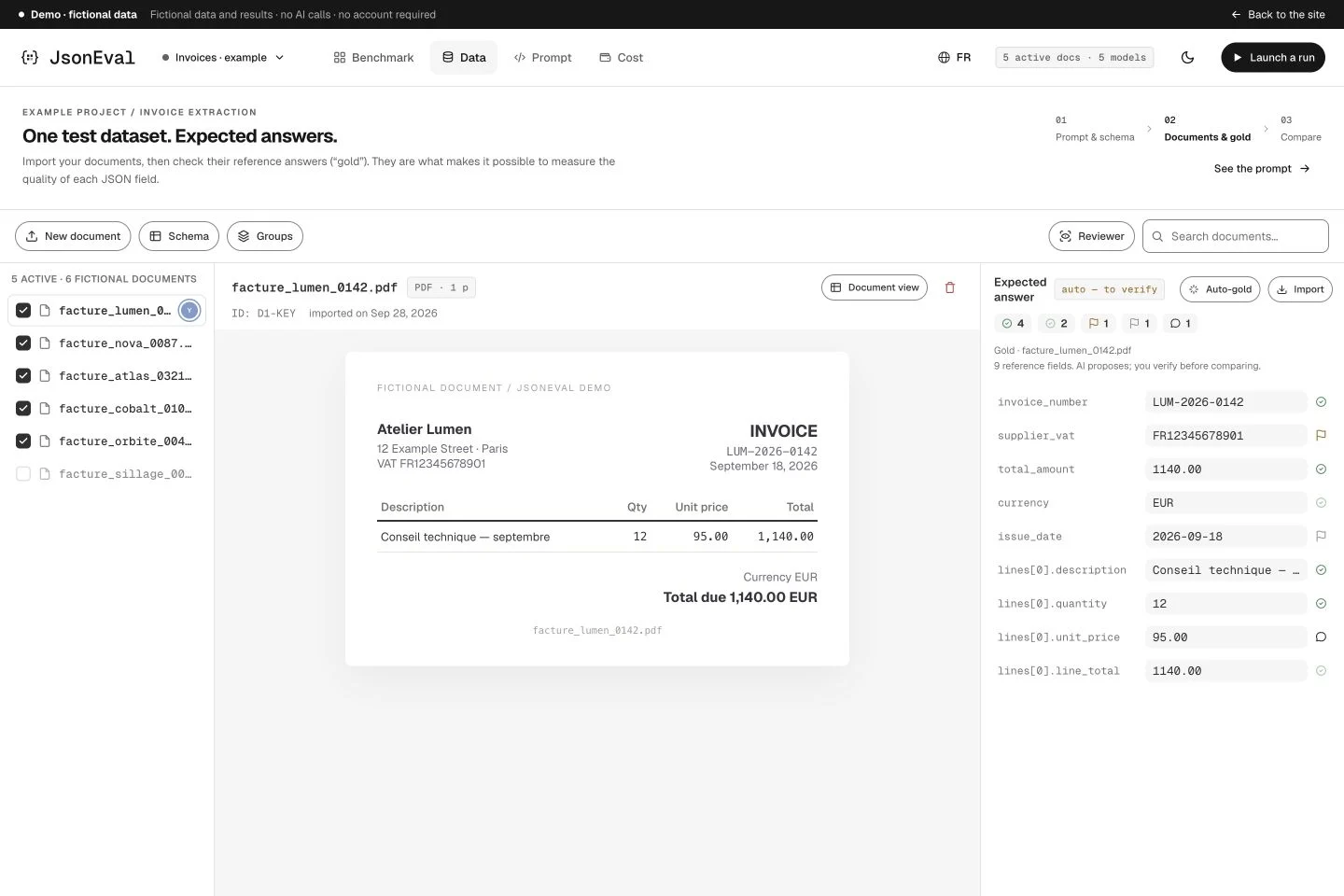
Read the expected answer alongside its document. Review, correct and discuss uncertain values.
Explore documents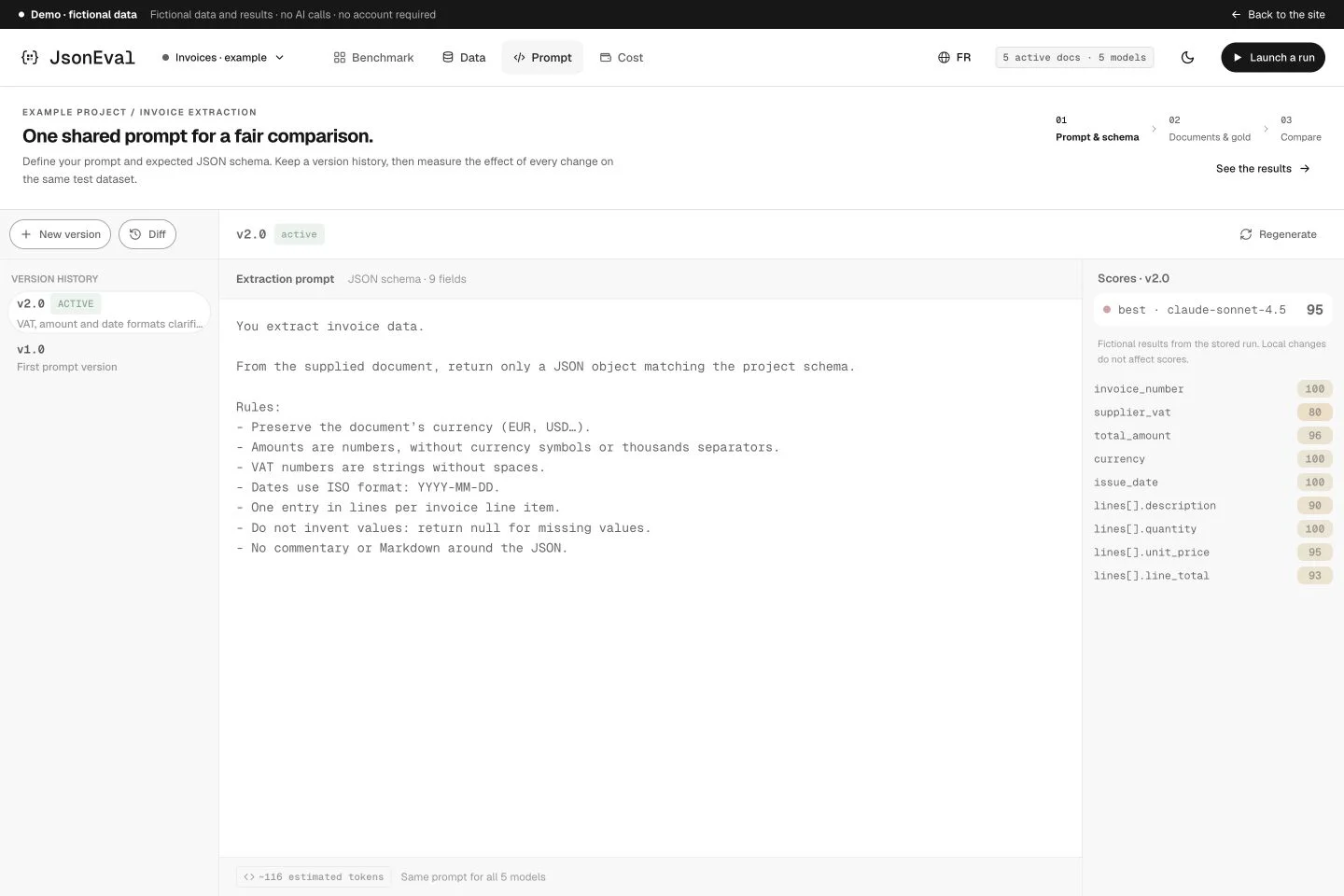
Turn an instruction into a version. Compare its results before making it your active prompt.
Explore promptsRun and inspect evaluations from your terminal, keep project context and prepare integration into your development workflows.
$ jsoneval evaluate
↳ project · dataset · prompt · models
↳ field scores · cost · regressionsGive your coding assistant the context of your evaluations: prompts, regressing fields and results to explore together.
“Which fields regress
with my new prompt?”
The web app is available. The CLI, AI plugin and CI integration are planned and not yet released.
A black-and-white identity, a need expressed in a few words and a demo to explore before creating an account.
See what’s new BenchmarkNative PDFs or image pages, a selected provider: model variants enrich the comparison. Cost analytics become more precise.
See what’s new DataFind values in documents and correct repeated ones in the Reviewer. References remain at the heart of evaluation.
See what’s newLooking for a tool to evaluate the JSON outputs of your AI requests? Here is what JsonEval covers and what is coming next.
JsonEval evaluates JSON answers generated by AI models. It benchmarks structured extraction: you provide a prompt, schema, documents and reference answers, then compare LLMs and prompt versions field by field.
A validator checks structure and types. Yet perfectly valid JSON may contain a wrong amount, a missing line or an invented value. JsonEval compares content with expected answers and assigns field scores. It complements structural validation.
No. The web app guides project setup: prompt, schema from a JSON example, documents, reference values and a first comparison. The visual builder and assisted gold preparation help you build the evaluation dataset.
Yes. JsonEval uses the OpenRouter catalogue. Compare multiple models on the same dataset and prompt, along with PDF input or provider variants. Availability depends on the models and providers involved.
Gold is the expected answer: your ground truth. Each extracted field is compared with this reference using a suitable metric: exact match, text, meaning, numbers, dates or sets. Scores are continuous between 0 and 1; they do not replace human review of gold.
The CLI and AI tools plugin are planned. They will bring evaluation to the terminal and coding assistants. The web application is available today; no installable command or CI integration has been released yet.
No. The public demo only uses fictional documents, answers, scores and costs prepared in advance. It requires no account or API key and runs no inference. Interactions stay in your browser.
The app shows an estimate before actions that call an LLM. Analytics separate extraction and judge costs and identify estimates. Prepaid credits, Stripe and connecting a personal key in JsonEval are still planned; the demo is not a pricing offer.
Explore a fictional project. Then switch to your own documents.
No-account demo · Fictional data · No inference